Guides
7 min
By QwikPrint Team

Quick answer
The fastest way to find a xerox shop near you is to open Google Maps, search for "xerox shop" and switch on the "Open now" filter. If it is late at night or every shop around you is closed, a self service printing kiosk is the next best option. At a Qwikprint kiosk you upload your file from your phone, pay online and collect your printout with a one time password. Kiosks are built for 24/7 use, although access depends on where the kiosk is installed.
Key takeaways
Google Maps with the "Open now" filter is the quickest way to find a nearby xerox shop.
Searching with a landmark, such as a court, college or railway station, gives better local results than a general search.
At night, a self service printing kiosk is usually easier than hunting for an open shop.
Keep your file ready as a PDF and decide colour, sides and copies before you leave.
You can print straight from WhatsApp, so there is no need for a pen drive or a computer.
It is 10 pm. A form needs two printed copies before 9 am tomorrow, and the xerox shop near your house closed at 8. If you have ever been in this spot, you know how stressful it feels. You open your phone, type "xerox shop near me" and hope for the best.
This guide shows you how to find a xerox shop that is open right now, how to avoid wasted trips, and what to do when every shop nearby is closed. You will also learn how to print straight from your phone without a pen drive or a computer.
What does "xerox shop near me" really mean?
In India, "xerox" started as a brand name but is now used for any photocopy shop. So "xerox shop", "photostat shop", "photocopy shop" and "zerox shop" all point to the same kind of place. Most of these shops also take printouts from a pen drive or phone, scan documents, and offer lamination and spiral binding.
When you search for a xerox shop near you, you usually want three things: a shop that is close, a shop that is open at this very moment, and a price that is fair. The tips below help you check all three quickly.
Why is it so hard to find an open xerox shop?
Most xerox shops are small businesses with fixed hours. Many close by 8 or 9 pm, and some stay shut on Sundays and public holidays. During exam season, admissions and festival rush, the shops that are open can have long queues.
The problem gets worse where the nearest shop is far away. Families often need printed forms and reports at short notice, and printing problems inside hospitals are a good example, because the hospital printer is usually kept for staff. Travellers face the same trouble at railway stations and airports, where a ticket, ID copy or form is needed right before departure and the closest shop is outside the premises.
6 ways to find a xerox shop near you right now
Use these methods in order. The first four work well during the day. The last two help when it is late or when you want to skip the queue.
1. Use Google Maps with the "Open now" filter
This is the quickest method. Open Google Maps, type "xerox shop" or "photocopy shop", and tap the "Open now" filter. Maps then shows only the shops that are open at this moment, along with the distance and the closing time.
Check the star rating and recent reviews for comments about queues and rates.
Look at the photos to see whether the shop has a colour printer, if you need colour.
Call before you walk over if it is after 8 pm, since closing times on Maps are not always accurate.
2. Add a landmark or area name to your search
A general search can show shops that are not really close to you. Add a landmark to get better results, for example "xerox shop near railway station", "xerox shop near court" or "xerox shop near bus stand". Adding your city, such as Bengaluru, Ahmedabad or Chennai, also gives more local results.
3. Head to a college, court or government office area
Shops near colleges, courts and government offices see steady demand all day, so they tend to open early and close late. The trade off is price. Rates near RTO and court offices can climb as high as ₹15 per page. Qwikprint's guide on how much printing costs in India lists typical rates by area, so you know what to expect before you pay.
4. Ask people nearby
Your hostel warden, the security guard of your society or the shop owner next door usually knows which xerox shop stays open late. This works especially well in a new city, where online reviews are often thin.
5. Use a self service printing kiosk
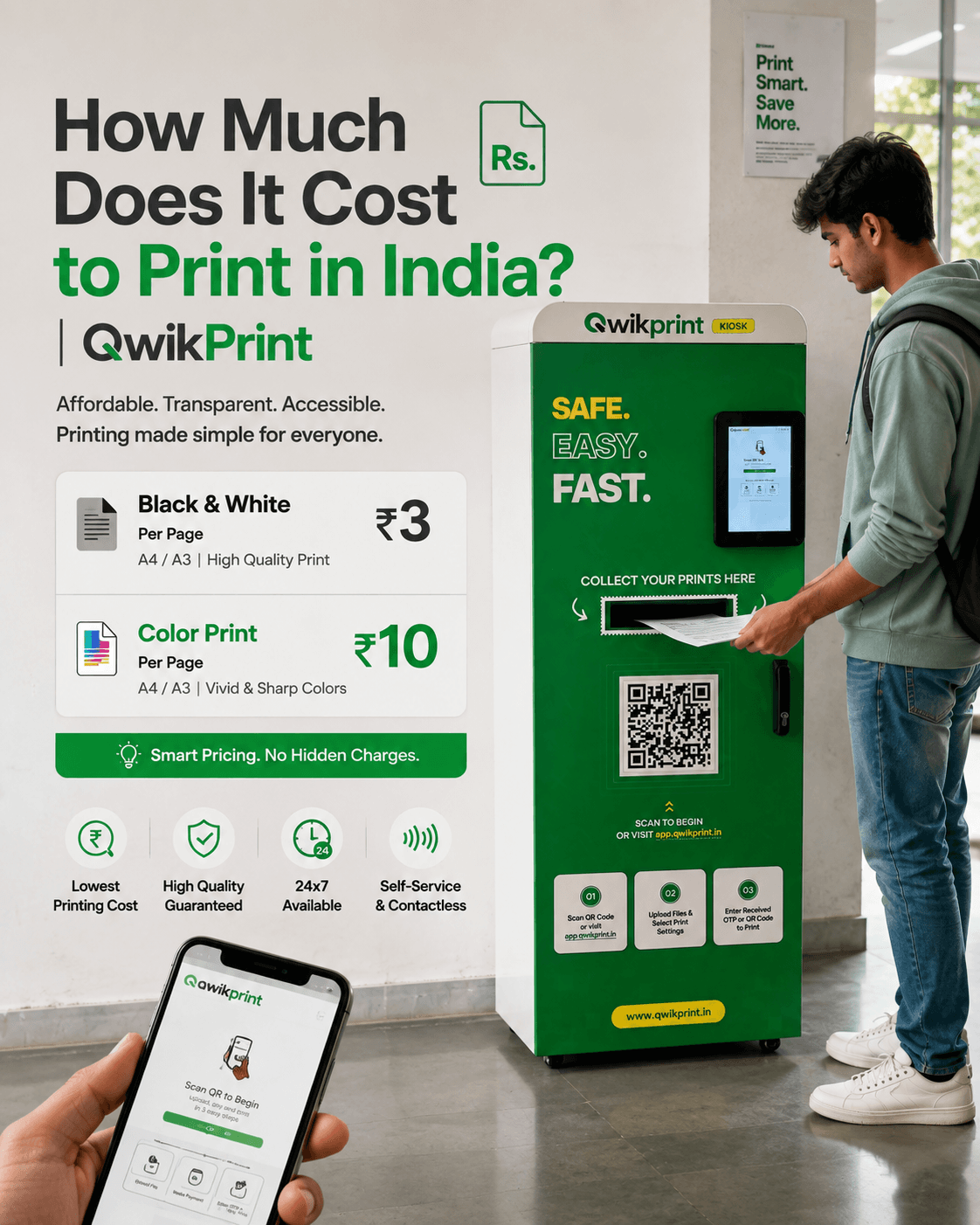
When every shop is closed, a self service printing kiosk is the easiest answer. A Qwikprint kiosk works on your schedule, with no staff and no queue. Here is how it works:
Scan the QR code on the kiosk with your phone.
Upload your file from your phone, laptop or Google Drive.
Choose your print settings, such as colour or black and white.
Pay online.
Enter your 4 digit OTP or scan the QR code on the machine, then collect your printout.
Qwikprint says your files are encrypted and deleted after printing, and that a print is ready in under 60 seconds. Kiosks are built to run 24/7, but a kiosk inside a college, office or mall can only be used when that building is open. To see where the nearest kiosk is, use the Qwikprint Find a Kiosk page.
6. Send your file to a partner xerox shop online
If you prefer a normal shop but want to skip the wait, Qwikprint also works with local xerox shops. On the Qwikprint xerox shop page, the flow is simple: pick a shop near you, upload your file, choose your print settings, pay online and receive an OTP. When you reach the shop, the owner enters your OTP to unlock the order and print it.
Xerox shop vs self service kiosk: which one should you use?
Both options work. The right one depends on the time, the job and how private your document is.
Local xerox shop | Self service kiosk | |
|---|---|---|
Opening hours | Fixed hours. Many close early or on holidays. | Built for 24/7 use, but depends on the location. |
Waiting time | Queues are common at peak times. | No queue unless someone is already at the machine. |
Privacy | Staff usually handle your file on their computer. | Files are encrypted and deleted after printing, as per Qwikprint. |
How you send files | Pen drive, email or WhatsApp to the shop. | Upload from phone, laptop or Google Drive after scanning a QR code. |
Price | Rates change by shop and area. | Flat per page rate. Qwikprint lists ₹3 for black and white and ₹10 for colour. |
Extra services | Binding, lamination and photos at many shops. | Focused on printing. Visit a shop for binding or lamination. |
Use a local xerox shop when you need binding, lamination, passport photos or a very large bulk job. Use a self service kiosk when you need a quick print at an odd hour, when you want to avoid queues, or when the document is private.
What to do before you leave for the xerox shop
A little preparation saves you a second trip.
Save your document as a PDF. It keeps the layout the same on every machine.
Check the page count and decide how many copies you need.
Decide on colour or black and white, and single side or double side.
Keep payment ready, such as UPI or cash, and keep your phone charged.
Carry only the original documents you need, and collect every copy and original before you leave.
How to print from your phone without a pen drive
You do not need a computer to print. If the file is already on WhatsApp, you can send it for printing in a few steps. Qwikprint's guide to printing from WhatsApp explains the full process. In short, you send your document to the Qwikprint WhatsApp number, open the link you get back, choose your print settings, pay, and then enter your OTP on a kiosk touch screen to collect your printout. There is no app to install and no pen drive to carry.
Simple ways to save time and money on printing
Print in black and white unless you really need colour. It costs less.
Use double sided printing for long documents to save paper and money.
Print everything in one visit, so you pay and wait only once.
Avoid peak hours near colleges during exams and near courts on working days.
Compare rates before you hand over a large job, especially near RTO offices and courts.
Where do people need a xerox shop in a hurry?
Some places create last minute printing needs again and again. According to Qwikprint's guide to the best locations for a printing kiosk, demand is highest at:
Colleges and universities, where students print assignments, project reports and exam material.
Government offices, RTOs and courts, where people need copies of IDs, affidavits and forms.
Railway and metro stations, where travellers need tickets and ID proofs.
IT parks and corporate offices, where staff print contracts and reports.
Hostels and PGs, where residents need prints at odd hours.
Coaching centres, where students need mock tests and notes.
If you spend time in one of these places, find the nearest kiosk or shop before you need the print, not after. Airports follow the same pattern, which is why Qwikprint explains why every airport in India needs a printing kiosk.
Run a xerox shop or have space for a kiosk?
If you own a xerox shop, you can join the partner network mentioned above and receive online print orders. If you are planning to start something new, read how to start a xerox business in India with no staff, or look at the Qwikprint franchise options if you want to own or host a kiosk.
Frequently asked questions
How do I find a xerox shop near me that is open now?
Open Google Maps, search for "xerox shop" and switch on the "Open now" filter. Call the shop first if it is late in the evening. If nothing is open, use a self service printing kiosk.
Is there a 24 hour xerox shop near me?
Some shops in busy areas stay open late, but very few run all night. Self service printing kiosks are built for 24/7 use, although access depends on where the kiosk is installed. You can check kiosks in your city on the Qwikprint Find a Kiosk page.
What is the difference between xerox, photocopy and photostat?
In India, all three words usually mean making a copy of a document. Xerox is a brand name that became a common word, and photostat is an older term for the same thing. A printout means printing a digital file from your phone or computer.
Can I print from my phone without going to a shop with a computer?
Yes. You can scan the QR code on a Qwikprint kiosk and upload your file from your phone, or send the file on WhatsApp and collect the print with an OTP. Read the Qwikprint guide to printing from WhatsApp for the steps.
Is it safe to print personal documents at a public machine?
It is safe when the machine protects your files. Qwikprint says files are encrypted and deleted after printing, and your printout is released only with your OTP. At any shop or kiosk, collect all your copies and originals before you leave.
How much does a xerox cost in India?
It depends on the city and the shop. According to Qwikprint's price guide, a black and white page usually costs between ₹3 and ₹15, and colour starts at about ₹10. See the full breakdown in how much printing costs in India.
Final thoughts
Finding a xerox shop near you does not have to be stressful. Start with Google Maps and the "Open now" filter, add a landmark to your search, and ask people nearby when you are in a new place. When it is late and every shop is shut, a self service kiosk gives you a way to print at any hour. Keep your file ready as a PDF, and you will be done in minutes. To find the closest option, visit the Qwikprint Find a Kiosk page.