General
8 min
Everything on Your Dashboard
When you become a QwikPrint franchise partner, you are not just getting a kiosk — you are getting a complete management system that gives you full visibility into every aspect of your print business, from anywhere, at any time.
You do not need to visit your kiosk to know if it is working. You do not need to call anyone to check your earnings. Everything you need is right there on your dashboard.
Here is a detailed look at every feature your QwikPrint partner dashboard gives you.
Live Paper and Ink Alerts
Running out of paper or ink mid-day is one of the biggest revenue killers for any kiosk. A machine that cannot print is a machine that is losing money. The QwikPrint dashboard solves this completely with real-time stock monitoring and automatic alerts.
The dashboard tracks your paper and ink levels live, at all times. The moment either drops below a set threshold, you receive an automatic alert, giving you enough time to arrange a refill before the kiosk stops functioning. You are not waiting for a customer to complain or for the machine to stop working—you know before it becomes a problem.
For a franchise partner managing multiple kiosks across different locations, this feature alone saves enormous amounts of time and prevents revenue loss that would otherwise go unnoticed until it is too late.
Order History and Refunds
Every transaction that takes place at your kiosk is recorded and accessible on your dashboard in real time. Whether it is a ₹3 black-and-white print or a multi-page color document, every order is logged with its timestamp, print details, and payment status.
If a customer raises a complaint about a failed transaction or a print that did not come out correctly, you can look up the exact order within seconds and process a refund with a single click. There is no back and forth, no manual calculation, and no delay. The entire refund process is handled directly from your dashboard—clean, fast, and fully traceable.
This level of transaction transparency also helps you keep track of your kiosk's daily performance, identify peak hours, and understand your revenue patterns over time.
My Kiosks
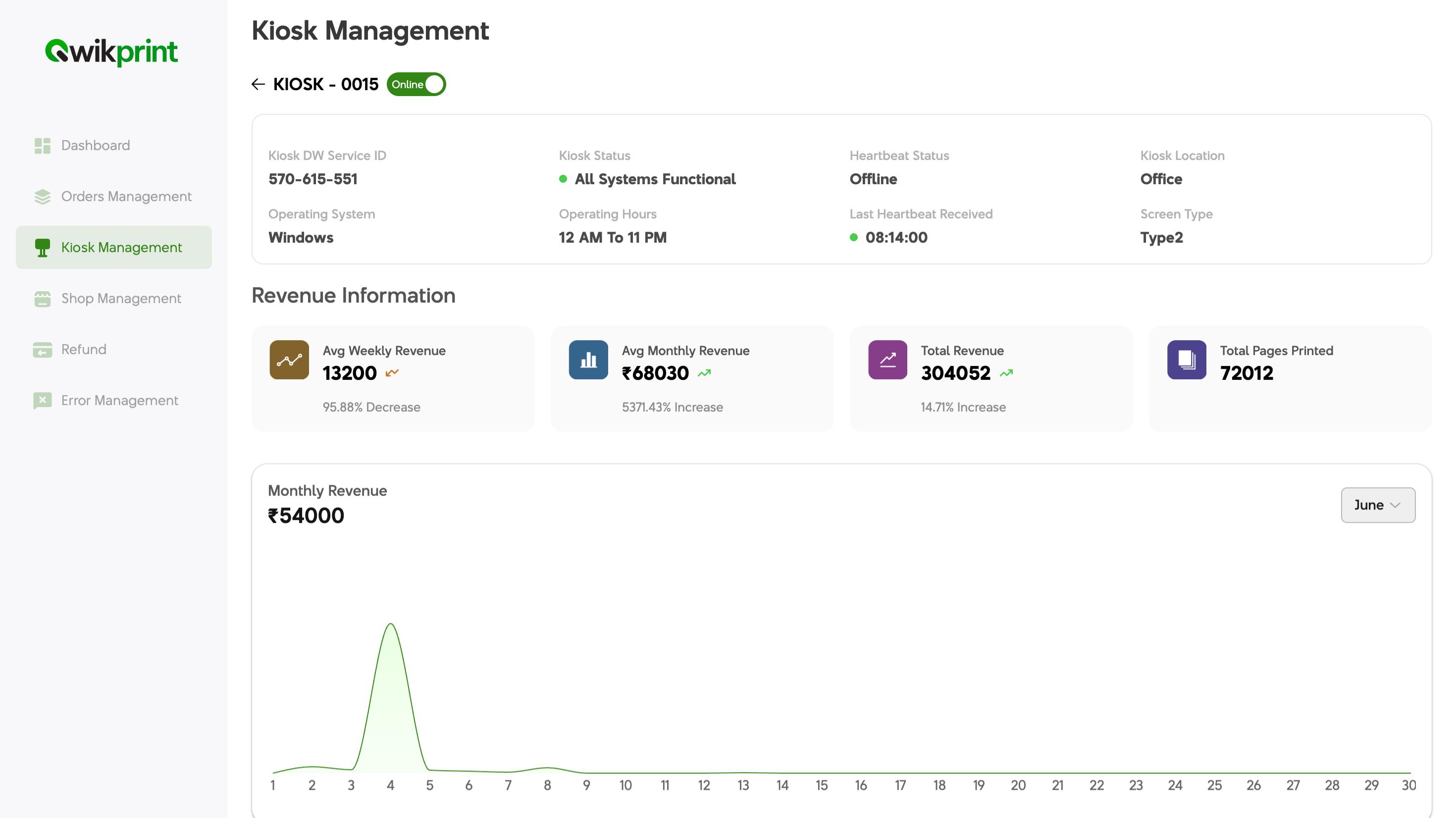
If you own more than one QwikPrint kiosk—or are planning to scale up—the My Kiosks section of your dashboard is where you get the complete picture. All your machines are listed in one place, with their live operational status and today's earnings displayed at a glance.
You can instantly see:
Which kiosks are online
Which kiosks are offline
What each kiosk has earned so far today
No switching between screens and no separate logins for each machine. Everything is consolidated into one clean view so you can manage your entire print business as easily as checking your messages.
Remote Monitoring
This is one of the most powerful features of the QwikPrint partner dashboard. Remote monitoring gives you the ability to see exactly what is happening at your kiosk in real time—without being physically present.
With remote monitoring, you can:
See what is currently printing
Check the machine's operational status
Restart services if needed
Troubleshoot issues directly from the dashboard
If something looks off, you can act on it immediately, often resolving the issue before a customer even notices. For software-level issues, this means problems get fixed in minutes rather than waiting for a technician to visit.
For franchise partners managing their kiosk as a side business or operating from another location, remote monitoring makes it possible to stay in complete control. Your kiosk can be running on a college campus across the city while you are at your office, and you will still know exactly what it is doing at any given moment.
How-To Guides
The QwikPrint dashboard comes with built-in, step-by-step guides for the most common kiosk maintenance tasks, including:
Paper refill
Ink change
Paper jam clearing
These are not generic manuals. They are clear, simple, visual instructions written specifically for the QwikPrint kiosk and are accessible directly inside the dashboard whenever you need them.
Even if you are not technically inclined, or if someone else is managing your kiosk on your behalf, the right guidance is always available on the spot. There is no need to call support for routine tasks or remember complicated procedures—just open the guide and follow the steps.
Settlement Calendar
One of the most common concerns for any franchise partner is payment clarity: When exactly does the money come in, and how much will it be? The QwikPrint settlement calendar answers both questions directly.
The settlement calendar provides a clear, date-by-date view of your upcoming and past payouts. You can see:
When your next settlement is due
How much it will be based on your kiosk's recent revenue
A complete history of all previous settlements
There is no ambiguity and no waiting to find out—just a transparent, predictable payment schedule that lets you plan your finances with confidence.
Why This Matters
Most franchise businesses require the owner to be physically present or constantly on the phone to know what is going on. QwikPrint is built differently.
The partner dashboard is designed to give you complete control and visibility without requiring your constant presence. Your kiosk runs itself, and your dashboard makes sure you are always informed, always in control, and never caught off guard.
Whether you own one kiosk or ten, the dashboard scales with you, giving you the same level of clarity and control regardless of how many machines you are running.